Compare

Xorventa vs Buffer

Post free on three networks. Pay less from the fourth. Let Xora write and reply.

Both let you post to three social networks for free. When you add a fourth, Buffer charges for every channel, including the first three. Xorventa Link charges for every network but one, so one always stays free. And when you want the posts written and the replies answered for you, Xorventa Social does it from the business facts you approve.

$150 vs $240
a year for 4 networks: Xorventa Link against Buffer Essentials
3 free
networks on Link; from the fourth, every network but one is paid
30 s
from one sentence in Claude to live on Bluesky and Facebook, in our own recording
The real difference

Buffer is a place to create and queue content. Xorventa runs your social presence for you, from facts you control.

What Buffer is built for

Creating content and publishing it on schedule

  • You write the posts; the AI Assistant helps you "refine and repurpose your content", and Buffer calls it "entirely optional"
  • A queue and calendar that publishes what you made, to 12 channels
  • A community inbox where you read and send each reply, with AI suggestions
  • Teams: approval workflows and unlimited users on Team
What Xorventa is built for

Control and distribution, from one set of approved facts

  • You approve the facts once; Xora writes each network's posts from them and answers comments and DMs from them
  • You choose per account: automatic, drafts for your approval, or off. A 1 or 2-star review always waits for you.
  • One post goes to every network at once, from the dashboard or one sentence in ChatGPT or Claude
  • The same facts answer your website, phone and email, so social says what the rest of the business says

If your work is making content and you want a polished place to queue it, Buffer is built for that. If you want your social presence written, sent and answered for you, saying only what you approved, Xorventa is built for that.

Price

What you pay as you add networks

Buffer Essentials
$240 a year

Yearly billing on both. Buffer Essentials is $60 a year per channel and, once you pay, every channel is charged. Xorventa Link is free for three networks; from the fourth, every network but one is $50 a year. Xorventa Social is one price for every supported network, with Xora writing and replying.

Side by side

Xorventa and Buffer, feature by feature.

ComparedXorventaBuffer
Free planXorventa: Link: 3 networks, no cardBuffer: Free: 3 channels
Networks you can post toXorventa: 10: Facebook, Instagram, LinkedIn, X, Threads, Bluesky, YouTube, TikTok, Pinterest, Google Business ProfileBuffer: 12, the same plus Mastodon and Substack
Price from the 4th networkXorventa: $50 a year for every network but one (Link)Buffer: $60 a year for every channel, the first three included (Essentials)
Post from ChatGPT or ClaudeXorventa: Yes, on Link and SocialBuffer: Yes, on every plan
Writes each network's postsXorventa: Xora drafts every network's version from your Business Facts (Social)Buffer: AI Assistant helps refine and repurpose the posts you write
Answers comments and messagesXorventa: Automatic, drafts for your approval, or off, per account (Social)Buffer: Community inbox; AI reply suggestions you send yourself
Learns what it couldn't answerXorventa: The question comes to you; answer once and it joins your Business FactsBuffer: Reply suggestions learn your writing style
Trial of the paid productXorventa: Social: 30 days, no credit cardBuffer: Free plan
Price

Add a fourth network and one still stays free.

Buffer and Xorventa Link both start free on three networks. The difference shows up the day you add a fourth. Buffer's pricing page says that once you pay, "you will pay for each channel — including any channels you had while on the Free plan." On Essentials that's $60 a year for every channel.

Xorventa Link is free for three networks and, from the fourth, charges $50 a year for every network but one. At 4 networks that's $150 a year against $240. At 6 it's $250 against $360. At 10 it's $450 against $600.

If you want Xora to write the posts and answer the replies, Xorventa Social is one price for the business, $69 a month or $690 a year, with every supported network included.

Post from your AI

One sentence in ChatGPT or Claude, and it's live.

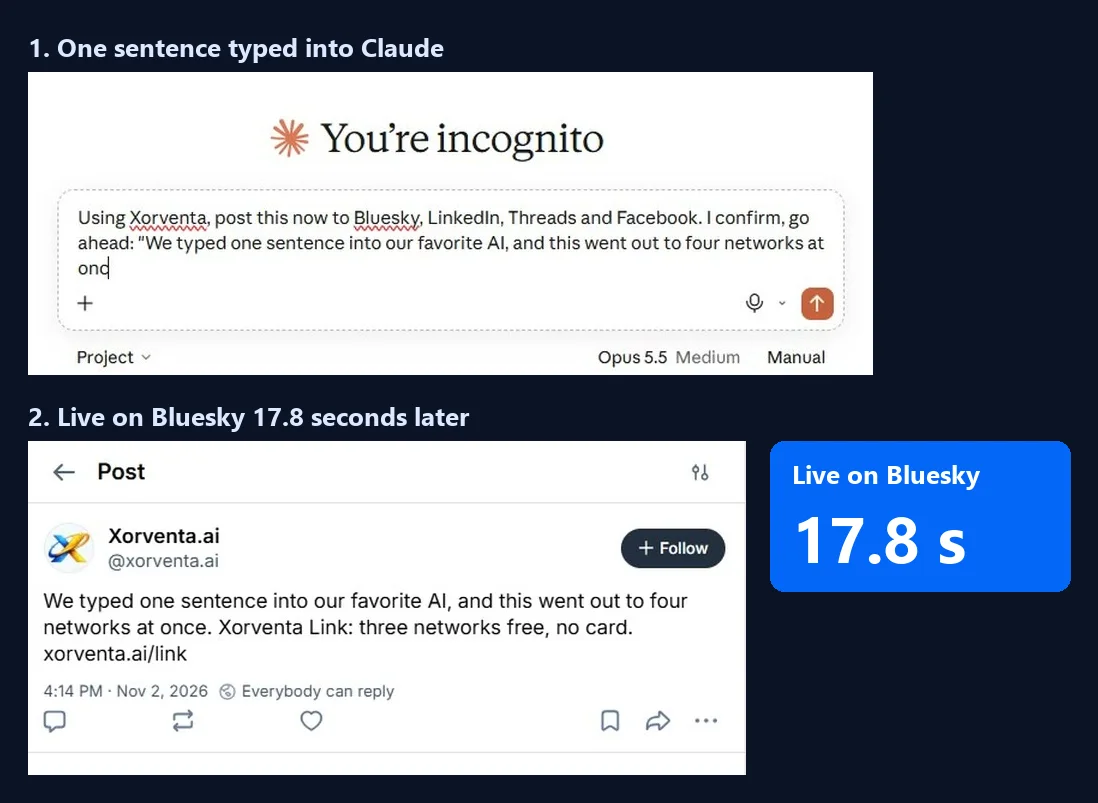
Both Buffer and Xorventa connect to the AI assistant you already use. With Xorventa you type one sentence, like "post this to Bluesky, LinkedIn, Threads and Facebook", and the post goes out. In our own recording it was live on Bluesky 17.8 seconds after we pressed send and on Facebook at 29.9 seconds.

On Link that's free for three networks, and it works from ChatGPT, Claude, Gemini or Grok.

A Xorventa post live on Bluesky and Facebook, timed at 17.8 and 29.9 seconds after sending from Claude
Our recording: one sentence typed into Claude, live on Bluesky at 17.8 s and on Facebook at 29.9 s.
Writing

Xora writes the whole campaign. Buffer's AI polishes what you wrote.

Buffer describes its AI Assistant as help to "refine and repurpose your content", and its own page calls the AI "entirely optional". You write the post; the AI helps you rework it.

With Xorventa Social you describe the campaign once: what it's about, which networks, how many posts. Xora writes each network's version from your approved Business Facts, sized to that network's limits, with an optional first comment. Every post is checked against each network's hard limits before it goes out, so nothing is cut off or quietly rejected.

Once you have at least five measured posts on a network, Xora can also write with what did better in your own published posts, and it tells you which posts it learned from. That's a hint from your own numbers, not a promise of results.

  • Images, carousels and video where each network supports them, and link preview cards
  • X Communities you have joined, at most one post per Community a day
  • A topic on Threads posts so people browsing the topic can find you
  • Review each draft, edit it, schedule it, or post it now

A Xorventa Social campaign Xora wrote, with each post, the networks it goes to and the note on what did better in past posts
A campaign Xora wrote on our own account: "Written with what got more likes in your posts published Aug 6 – Nov 4".
Replies

Comments and messages answered from your facts, not just suggested.

Buffer's community inbox gives you AI reply suggestions that "learn your style", 5 a week on the free plan and unlimited on paid plans. You still read each one and send it.

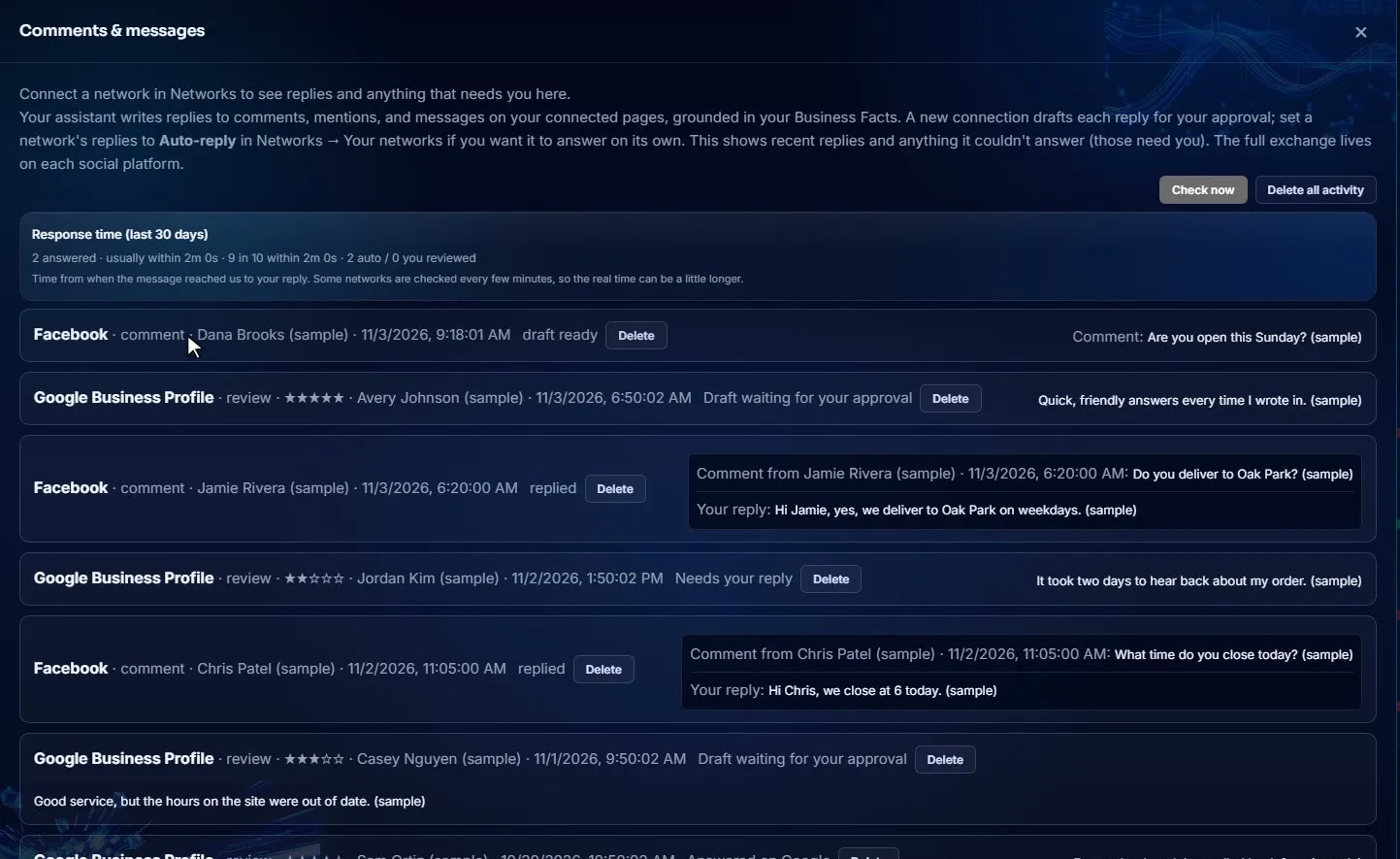
Xorventa Social answers comments, mentions and direct messages for you, where each network allows it, from the Business Facts you approved. For each connected account you choose: answer automatically, draft each reply for your approval, or off.

If a message asks something your facts don't cover, Xora doesn't guess. It flags the question for you. When one message asks several things and only some are covered, the covered ones are answered and the person is told their other question was passed on.

The Xorventa Comments and messages screen with replies Xora sent and drafts waiting for approval
Comments and messages on our account: replies sent from the Business Facts, and drafts waiting for approval.
Google reviews

Your Google reviews, answered in the same place.

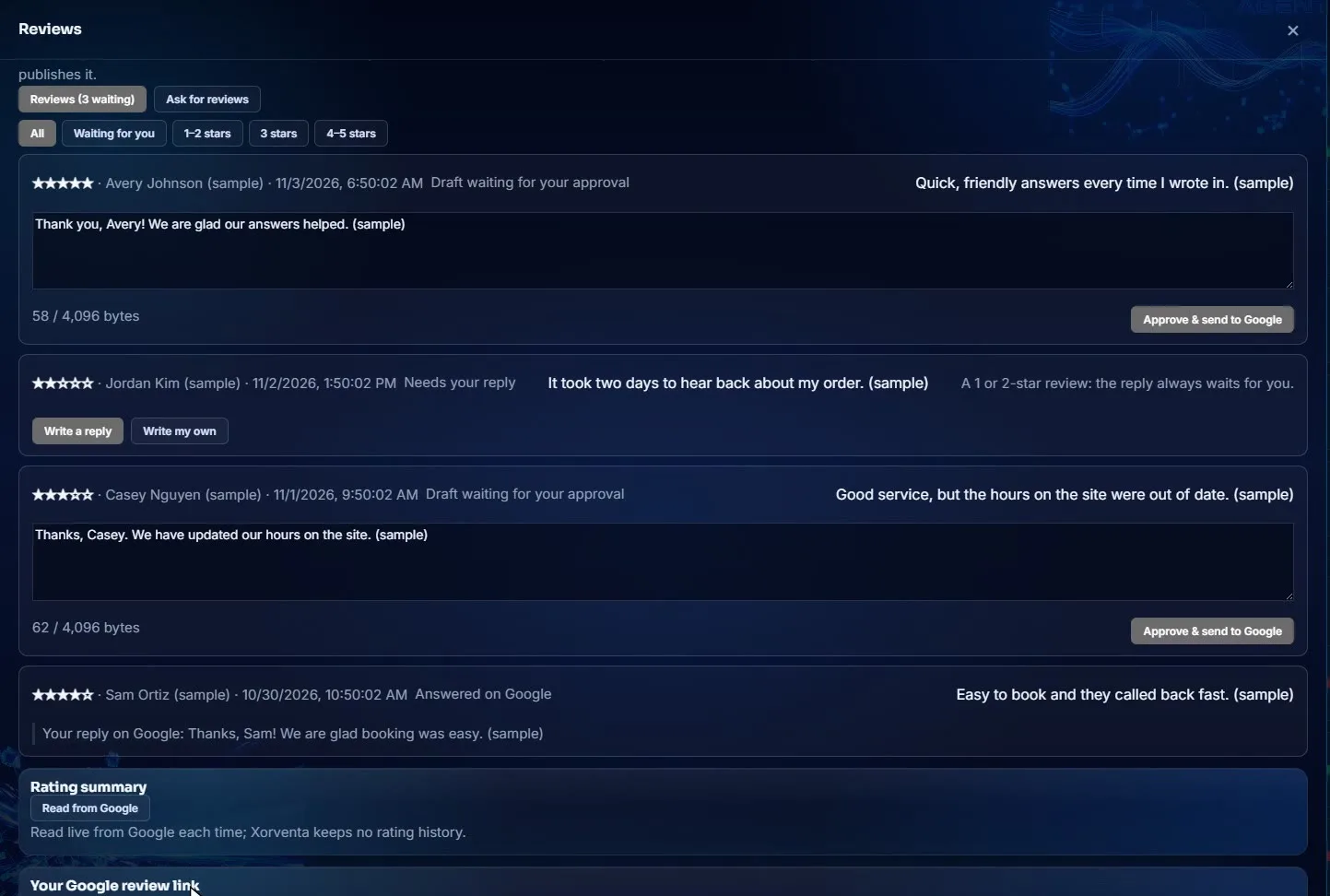
Social shows your recent Google reviews with the stars, the date and any reply already given, and drafts a reply from your Business Facts that fits the rating. A 1 or 2-star review always waits for you, and you're emailed about it right away.

You can ask customers for a review by email, after an appointment, from a pasted list or one at a time, with the same public Google link for everyone.

Google reviews in Xorventa with drafted replies waiting for approval
Google reviews with Xora's drafted replies. "A 1 or 2-star review: the reply always waits for you."
Planning

A calendar and posting times you set once, on Link too.

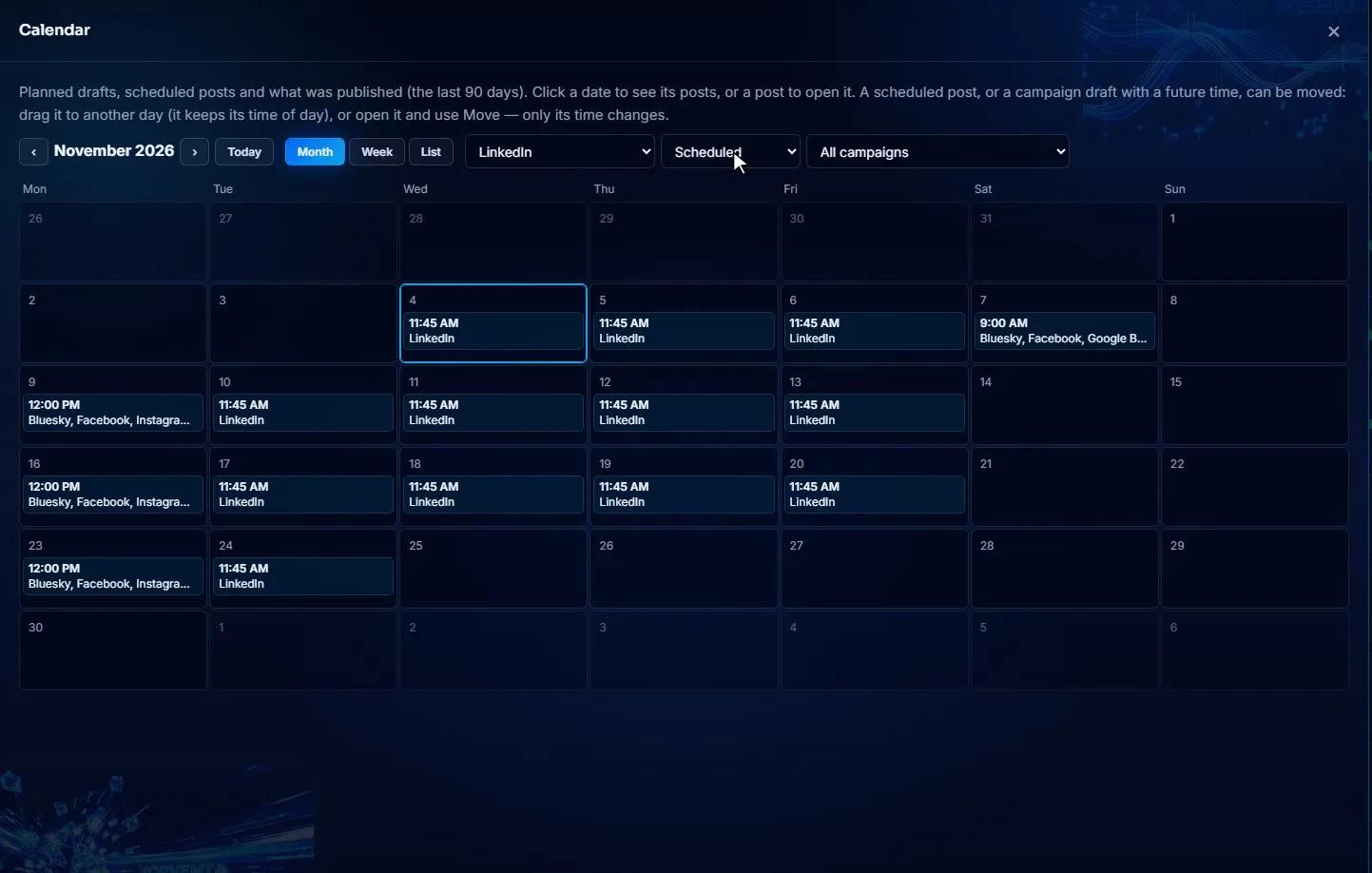
See planned, scheduled and published posts by day, move a post to another day, and drop a post into the next free time of a weekly posting schedule. Duplicate any post or save it as a template. Link includes the calendar, posting schedules, templates and Duplicate.

The Xorventa calendar showing scheduled posts by day
The calendar on our account.
Xora learns

Answer a question once, and every channel knows it.

When you approve a reply, you can choose "Send reply and add to Business facts". The answer goes out, and it joins your Business Facts, so the next person who asks gets it straight away, on social and on your website, phone and email if you use them.

Buffer's reply suggestions learn your writing style. Xora learns your business.

A fair comparison

Where Buffer fits better

Buffer is a good product. These are the cases where it's the better choice, from Buffer's own pages.

You post to Mastodon or Substack

Buffer connects 12 channels, including Mastodon and Substack. Xorventa connects 10.

A team shares the account

Buffer Team, at $10 a month per channel, has unlimited users and approval workflows for posts.

You want AI reply suggestions for free, forever

Buffer's free plan includes 5 AI reply suggestions a week. On Xorventa, AI replies come with Social, after the 30-day trial.

You run more than 10 channels

Buffer's per-channel price drops above 10 channels. Xorventa Link goes up to 10 networks.

Who it's for

Pick Xorventa over Buffer if…

  • You post to four or more networks and want one of them to stay free
  • You'd rather describe a campaign than write every post for every network
  • Comments and DMs pile up and you want them answered from facts you approved
  • You want your Google reviews in the same place as your social replies
  • You want one set of Business Facts for social, your website and more
Switching

Moving over takes minutes.

  1. Start free with LinkThree networks, no credit card.
  2. Connect your networksEach network uses its own sign-in.
  3. Connect your AIPost from ChatGPT or Claude in one sentence.
  4. Turn on Social when you want Xora to write and reply30-day free trial, no credit card.
Questions

Frequently asked

Is Xorventa Link really free?

Yes. Link is free for three networks, with no credit card. From the fourth network, every network but one is $5 a month or $50 a year.

What does Buffer charge when I add a fourth channel?

Buffer's pricing page says that once you pay, you pay for each channel, including any you had on the free plan. Essentials is $5 a month per channel, $60 billed yearly, so 4 channels is $240 a year.

Can I post from ChatGPT or Claude?

Yes. Link and Social both connect to your AI assistant, so you can ask it to post or schedule and it goes out from your Xorventa account.

Does Xora post or reply without asking me?

You decide. For each connected account, replies can be automatic, drafts for your approval, or off. A 1 or 2-star Google review always waits for you.

What happens when someone asks something Xora doesn't know?

Xora doesn't guess. The question comes to you. Answer it once and it can go into your Business Facts, so the next person gets the answer.

Is there a free trial of Social?

Yes, 30 days with no credit card. It covers all of Social except X posts with a link.

Sources

Where the Buffer figures come from.

Buffer figures are Essentials at $5 a month per channel, $60 billed yearly, from Buffer's pricing page. Xorventa Link is $50 a year for every network but one from the fourth; Xorventa Social is $69 a month or $690 a year for every supported network.

Buffer details read on Buffer's own pages on November 13, 2026: Buffer pricing, Buffer AI Assistant, Buffer Community, Buffer MCP. Prices and features change; check Buffer's site for its current terms.

See it for yourself.

Xorventa Link and Xorventa Social: answers from the facts your business approves.