Assist Basic
Website answers
Your website assistant answers visitors from your approved business information — and says so plainly when something is not covered, instead of guessing.

Persona brings together Assist Basic, Social Basic and SEO Plus, with Xora helping you use them and one place for decisions that need your attention.
Xora is your AI assistant: ask for guidance, the right page or a supported action. Your approved business information guides her answers. Your permissions control her actions. She asks before publishing, sending or deleting; purchases and billing stay with you.
Persona keeps your Business Facts — the business information you review and approve once, which Xorventa uses across its AI products at the center: business name, services, hours, locations, offers and brand voice. From there it works across search, Google Business and your connected social networks, and reaches your phone, email and calendar through the Assist add-ons. The Xora at the bottom right of this page is our website assistant; once you sign in, Xora is your own account assistant.
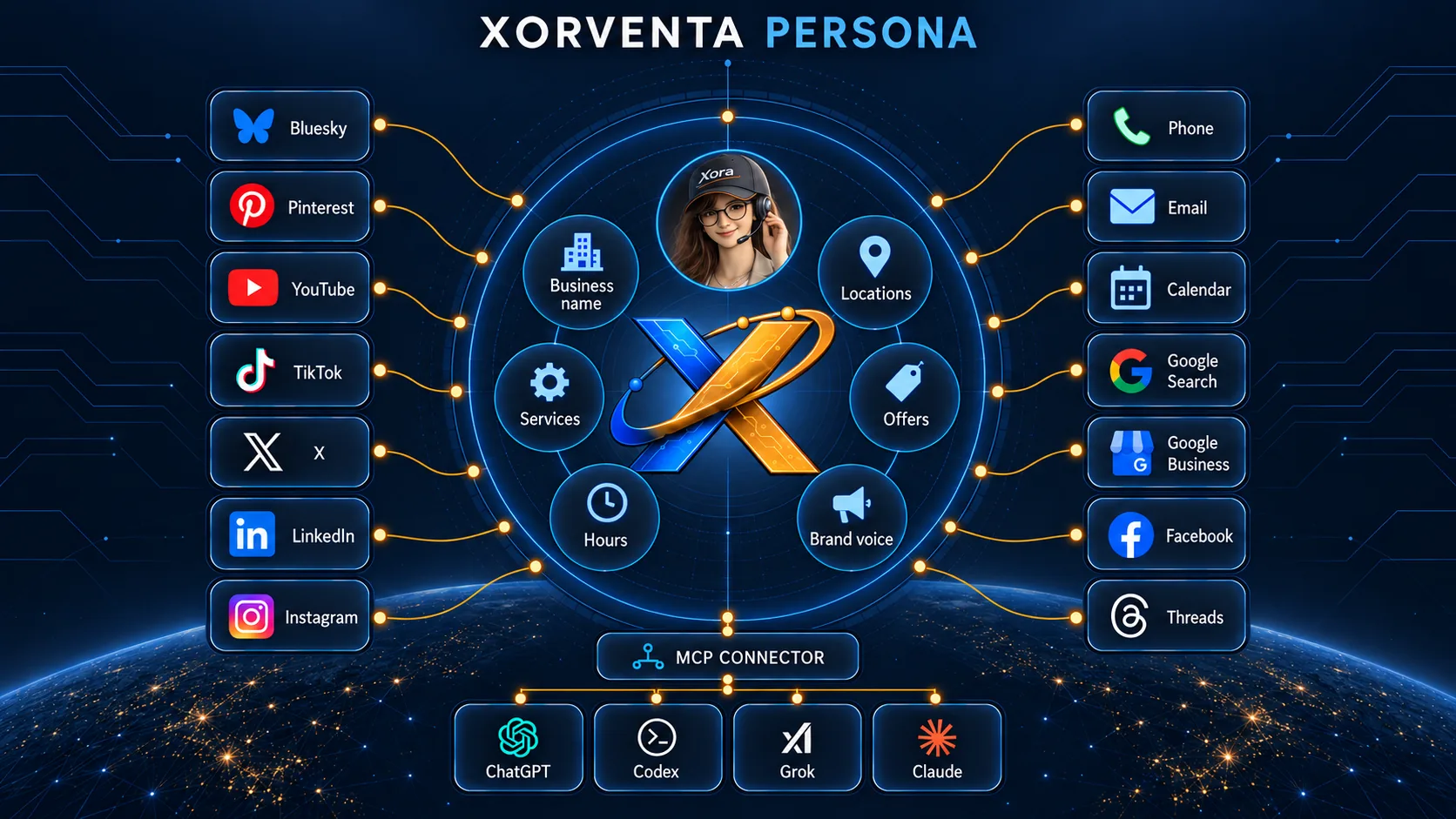
Connect the AI assistant you already use through the Xorventa Connector and ask Xora for answers and account work right there — across your website, social and search. Your permissions still decide what she can do, and anything that publishes, sends or deletes waits for your yes. Included with your account.
Explain it · Take me there · Do this for me. Xora is an AI assistant for you, the signed-in owner — never for visitors on your own website. Your approved business information guides her answers and your permissions control her actions: three switches — change settings, publish and send, delete — each off until you turn it on. Purchases, plan changes and connecting a third-party account stay with you; she explains those and takes you to the page. Xora can remember your confirmed preferences, and you can review, change, download, delete or switch that memory off; it never gives her permission to act.
“Publish my prepared post.”
Names the post and waits for your yes, said or typed — never a tap. The permission must be switched on first.
Published — or not, with the actual result reported back to you, and listed as hers.
Illustrative example.
Replies, website changes and business answers that need your yes are listed together — each with the reason it is there, and each sent or applied right where it is listed, through the product that owns it.
Reply to a review — drafted from your approved business information.
Website description to approve — the current wording, and the proposed replacement.
Business answer to add — a question your information did not cover.
Illustrative example. Work already published stays published.
Persona includes Xorventa Assist Basic, Xorventa Social Basic and Xorventa SEO Plus — you do not buy them separately. Your approved business information and chosen writing style guide the work across all three. What you choose is which channels to connect; anything left unconnected is shown as unconnected rather than reported as coverage. Higher tiers remain paid upgrades.
Your website assistant answers visitors from your approved business information — and says so plainly when something is not covered, instead of guessing.
Social work is drafted from the same approved information and governed by the reply mode and approval settings you chose for each network. 5,000 Social actions a month and 10 GB of post media — upgrade to Social Plus inside the package for $289/mo.
Search-readiness findings and grounded drafts — 60 a month — arrive in the same list of decisions as everything else.
Explore included AssistExplore included SocialExplore included SEO
Assist Basic, Xorventa Social Basic and Xorventa SEO Plus in one package, with Xora helping you across them and one place for the decisions waiting on you.
or $2,189/year
Includes a 30-day free trial. Your Persona trial includes one SEO report, and website changes are prepared rather than published until you subscribe. A card is required to start. Cancel any time from Billing - cancelling ends the products the package was providing, and anything you bought separately and kept is unaffected.
Assist Basic + Xorventa Social Basic + Xorventa SEO Plus, coordinated around one approved set of Business Facts. Includes one chat window at 250 conversations a month. Xora works across all three from that one approved foundation, with one list of the decisions waiting on you, acted on item by item — which is what the package gives you that the products do not give you separately. Need more conversation capacity or voice? You pay only the difference - the configurations and what each costs are answered below.
Why SMB AI quality depends less on the model than on whether it answers from facts the business has reviewed and approved.
For small businesses, AI quality depends on a setup an owner can actually finish and a business can actually trust. What that requires.
Start your Persona trial: 30 days free. Your Persona trial includes one SEO report, and website changes are prepared rather than published until you subscribe. Assist Basic, Xorventa Social Basic, Xorventa SEO Plus and the coordination across them - $199/mo or $2,189/yr after the trial. A card is required to start. Cancel any time.